Desktop client for DeepSeek HarnessOpen Source · Apache-2.0
DSH Desktop ProThe DeepSeek Harness desktop client that works out of the box for individuals and can be managed centrally by a company
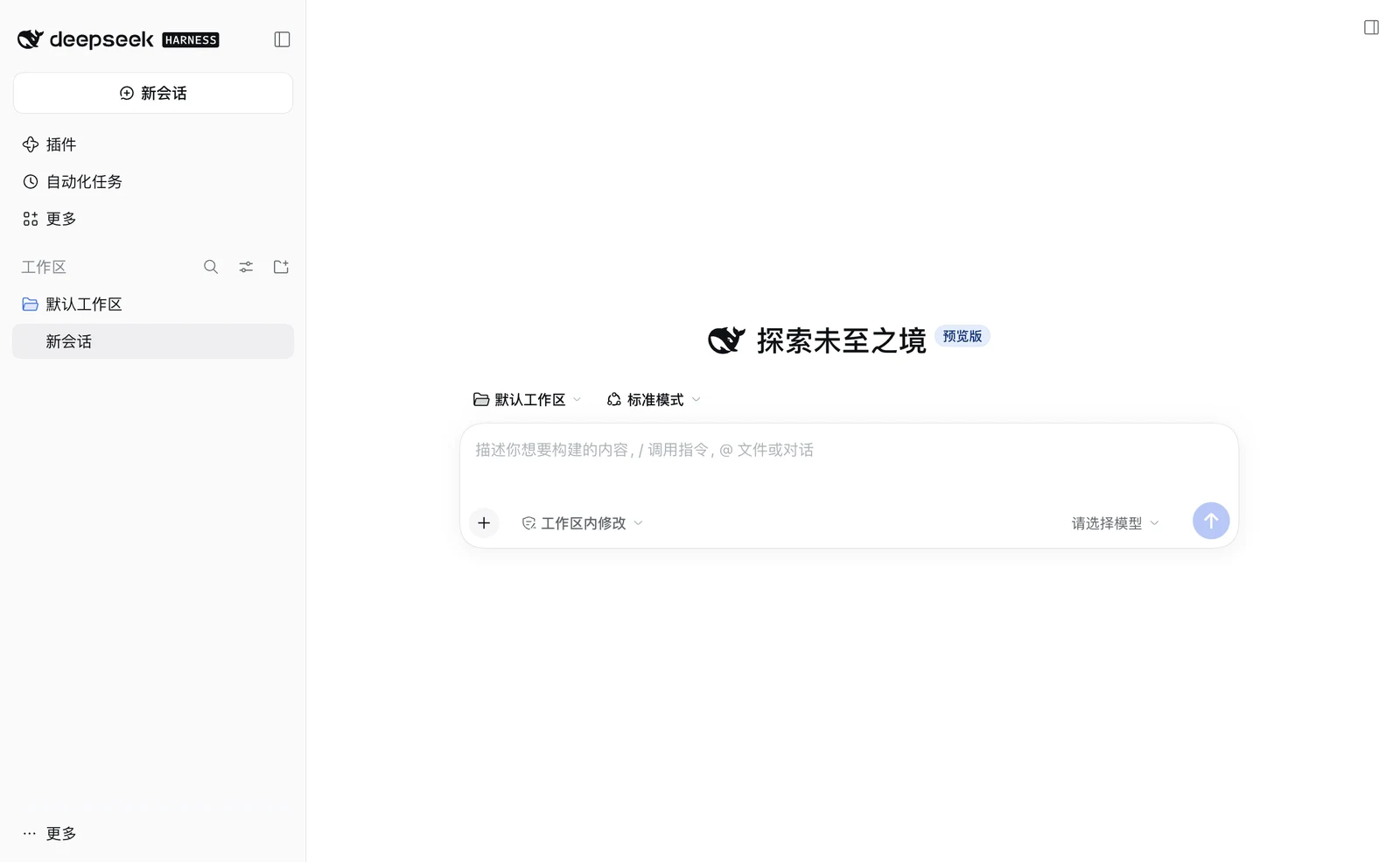
DSH Desktop Pro is an open-source desktop client for DeepSeek Harness (dsh). The installer includes the official runtime, so no separate Node.js or dsh CLI is needed. In a company, IT sets up models, plugins, skills and tool permissions once, and employees sign in and get to work.
- Current version
- 0.7.0-beta.5 (released 2026-11-18)
- Platforms
- macOS (Apple Silicon / Intel), Windows x64, Linux x64
- License
- Apache-2.0; client and management server are open source
- Author
- Bruce Van
What is DSH Desktop Pro?
DSH Desktop Pro is a desktop client for DeepSeek Harness (command name dsh), maintained by Bruce Van and released under the Apache-2.0 license.
The window loads the official Web UI, and the installer includes a pinned version of the official @deepseek-ai/dsh runtime. The client itself manages the runtime, the tray, notifications, automatic updates and security controls; it does not maintain a separate product interface.
Since 0.7.0 the same installer also provides organisation features: the client and an open-source management server together handle configuration rollout, a company model gateway, usage and limits, a plugin market, a skill library and audit. On a machine without an organisation configuration, it behaves exactly as for personal use.
How do personal and organisation use differ?
It is one installer with two ways to use it. A machine with an organisation configuration from IT runs in organisation mode; any other machine gets the personal client.
| Personal | Organisation | |
|---|---|---|
| Getting started | Enter your own API key | IT provides a configuration; employees sign in with their company account |
| Models | Your own DeepSeek or other model account | The company model gateway, with each employee's own key |
| Plugins and skills | Installed by you | Assigned by IT; people can add their own |
| Data directory | ~/.dsh or the client's own directory | A separate organisation directory; a personal ~/.dsh is never touched |
| Deployment | None | One configuration file, or the management server (Docker Compose) |
The organisation features are in beta. Until the final release the protocol between client and server may change, so upgrade both together.
What does the desktop client do?
It turns dsh from something you run in a terminal into a desktop app that stays available.
Stays in the background
It keeps running after the window closes and reopens from the tray or menu bar.
Manages the runtime for you
An official Web UI already running on the machine is reused; otherwise the client starts and manages the bundled runtime. It can also connect to an address you specify.
Plugins to browse from day one
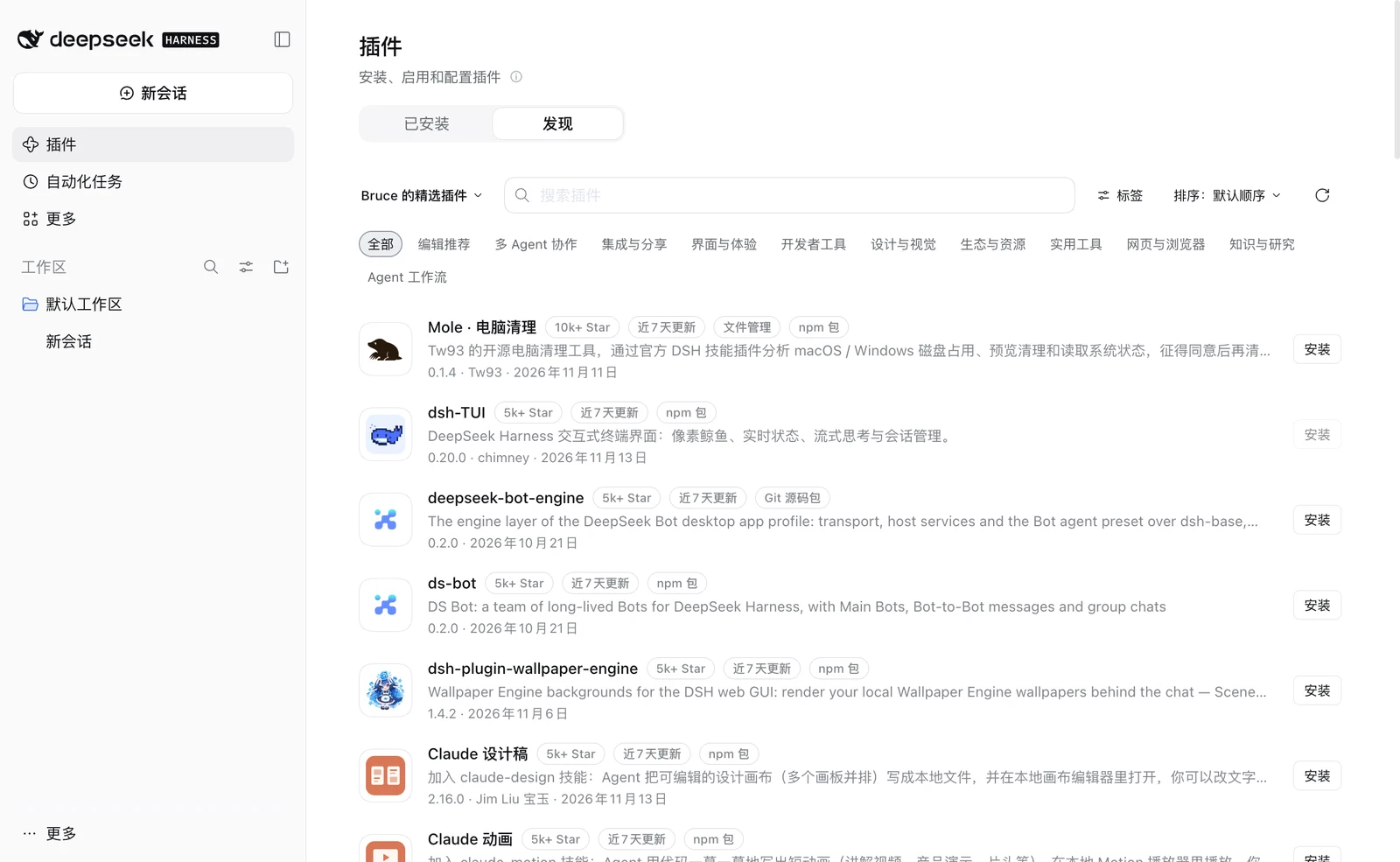
On first launch it subscribes to a curated plugin index you can browse and install from on the Discover page. The client only adds the subscription; it does not install plugins for you.
The installer also bundles the DSH Market Pro plugin market, enabled automatically in personal mode; turn it off in Desktop settings → Data environment. Organisation-managed profiles do not get it.
Automatic updates
Update packages are checked against SHA-256 before installing.
Isolated windows
Windows run sandboxed with context isolation, and navigation and permissions are restricted.
How can a company manage DeepSeek Harness centrally?
IT sets up models, plugins, skills and tool permissions once. Employees open the client and sign in with their company account, without configuring keys and plugins one by one.The organisation features arrived in 0.7.0 and are in beta.
Two ways to deploy
File mode
Place one managed.json in a system directory; the client opens straight onto the company's model gateway, with plugin indexes, skills and tool restrictions applied. No server is needed, and the file can be signed against tampering.
Server mode
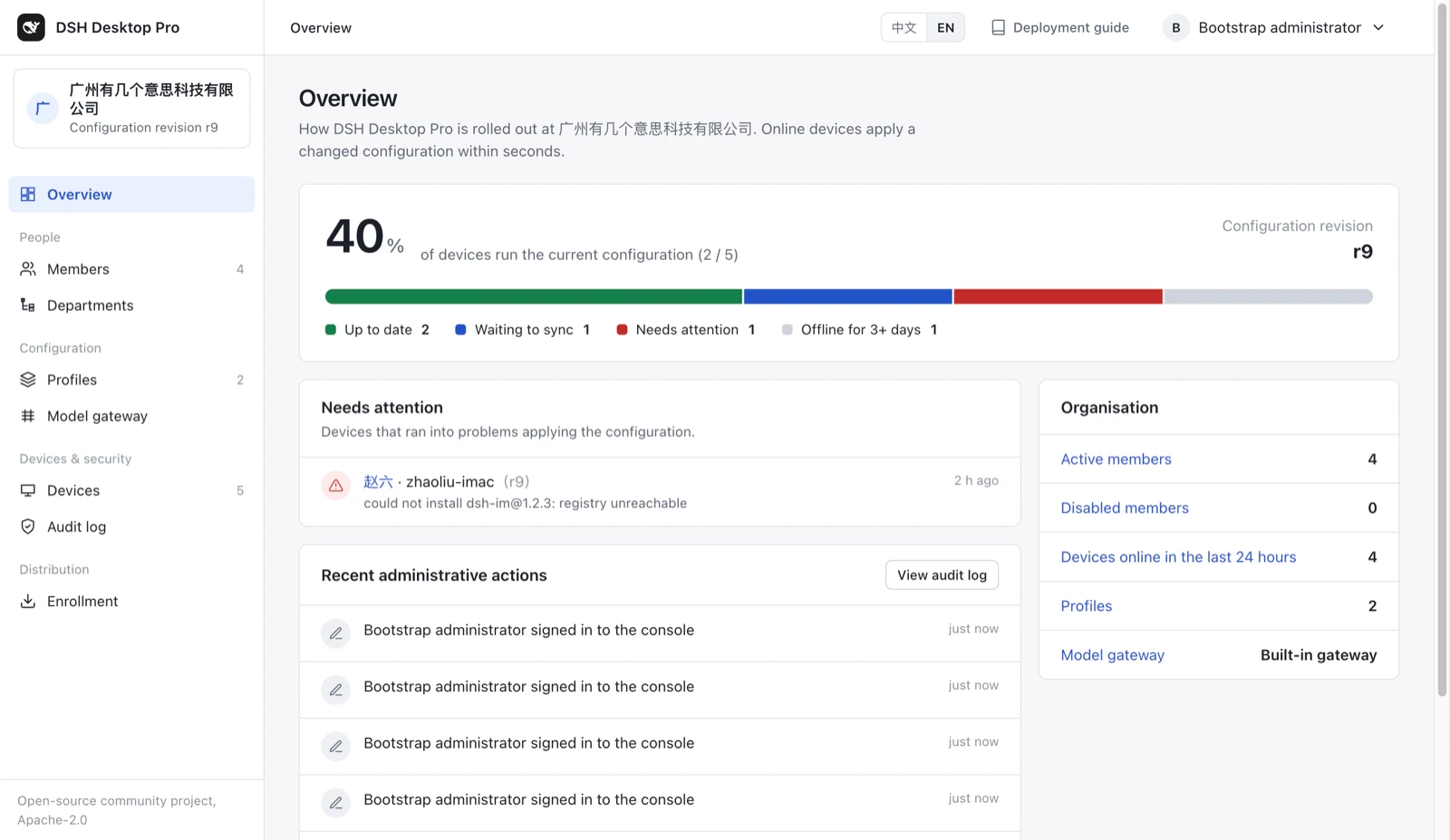
Run the open-source management server (Docker Compose + PostgreSQL); employees sign in with company SSO (any OpenID Connect provider), and IT manages configuration, models, usage, plugins and audit from the console.
Configuration rollout
- Profiles bundle models, plugin indexes, skills and tool permissions, and are assigned to everyone, a department or a person.
- Online devices apply a changed configuration within seconds; offline, a device keeps using the last configuration within a grace period.
- The console shows whether each device runs the current configuration, and which devices failed and why.
- When IT allows it, employees can switch between organisation mode and personal mode; personal data is unaffected.
Models, usage and limits
- The server's built-in model gateway connects to any OpenAI-compatible API, with as many upstreams as you need; LiteLLM can be used instead.
- The real key for the company's model service stays on the server; employees' machines hold only their own keys.
- Requests, tokens and cost by member, department and model, with a request log you can export for finance.
- Cost or token limits for the company, departments and people; when one is used up, requests are refused or continue on a cheaper model.
Plugin market and skill library
- Plugins IT has reviewed go into the company plugin market at a pinned version and appear first on people's Discover page.
- A risky plugin can be blocked, which removes it from every computer.
- A skill library for the company's skills: install one for everyone, or let people choose in the client.
Security and audit
- When an employee is disabled, their key stops working at once and their device removes the organisation's configuration.
- IT can disable specific tools. Disabled tools are not offered to the model, and blocked calls are recorded in the audit log.
- Each audit record is chained to the previous one, so edited or deleted records can be detected.
- Configuration sent to clients is signed and verified before it is applied.
How do I download and install DSH Desktop Pro?
Download the installer for your system from GitHub Releases. Release builds already include the official dsh runtime, so nothing is installed from npm on first launch.
| Your device | Installer (file name suffix) |
|---|---|
| macOS, Apple Silicon (M series) | mac-arm64.dmg |
| macOS, Intel | mac-x64.dmg |
| Windows, Intel/AMD 64-bit | win-x64.exe |
| Linux, Intel/AMD 64-bit | linux-x86_64.AppImage |
| Ubuntu 24.04, Intel/AMD 64-bit package | linux-amd64.deb |
Four steps for personal use
- On first launch, enter an API key or choose to configure it later. Keys are created on the DeepSeek Platform, which manages your account, balance and charges.
- Pick an agent preset or model if you need to.
- Add and select a project folder as the workspace for your sessions.
- Start a new session and send a task.
Good to know before installing
- The macOS and Windows installers are not yet signed with a developer certificate, so the system may block the first launch: on macOS choose "Open Anyway" under System Settings → Privacy & Security; on Windows choose "More info → Run anyway" in SmartScreen.
- A fresh data directory may start in English; change the language under Settings → General → Language.
- Employees do not enter a key: once IT has placed the configuration, open the client, click "Sign in to <company>" and finish signing in with the company account in the system browser.
How does DSH Desktop Pro relate to the DSH Plugin Directory?
The curated plugin index the client subscribes to on first launch is this site's DSH Plugin Directory feed, Bruce's Plugin Picks, built from the open-source awesome-dsh-plugin-pro project.
The preset only adds a subscription address. What to install is your choice on the Discover page, and installation is done by the official plugin manager. A company can use the same public index as a source and publish reviewed plugins to its own plugin market.
What is the current status and what comes next?
- Now
- 0.7.0 beta (latest release 0.7.0-beta.5). No new features are added before the final release, only hardening, fixes and pilot feedback.
- Recent updates
- Feishu (Lark), DingTalk and WeCom sign-in and directory sync (beta.3); joining an organisation from Desktop settings and bundled-first Smart connection (beta.4); DSH Market Pro bundled again and a new whale icon (beta.5).
- After the final release
- More charts of configuration rollout, devices and usage; finer audit filtering and export; employees submitting the skills they write to the company skill library, for colleagues to install once reviewed.
Frequently asked questions
Is DSH Desktop Pro an official DeepSeek client?
No. DSH Desktop Pro is an unofficial community project. It is not developed, published, endorsed or supported by DeepSeek. DeepSeek, DeepSeek Harness, dsh and related names and marks belong to their respective owners. The project loads the official Web UI and bundles the official @deepseek-ai/dsh runtime.
Is DSH Desktop Pro free?
The client and the management server are open source under Apache-2.0, free to download and self-host. Model usage is charged by your model provider, for example the DeepSeek Platform.
Can individuals use it?
Yes. Without an organisation configuration the client is a complete personal desktop client and needs no server.
Do I need to install Node.js or the dsh CLI first?
No. The installer includes a pinned version of the official @deepseek-ai/dsh runtime, and nothing is installed from npm on first launch.
Does organisation mode read or change my personal data?
No. Organisation mode uses a separate data directory and does not read or write a personal ~/.dsh. After switching back to personal mode, your own sessions and plugins are still there.
Is this a browser wrapper?
The window loads the official Web UI, but the client also manages runtimes, connections, the tray, notifications, permissions, updates and organisation configuration. It does not maintain a separate product interface.
Does the preset subscription install plugins automatically?
No. The client only adds the subscription address. What to install is your choice on the Discover page, and installation is done by the official plugin manager.
Does an organisation deployment require a server?
Not necessarily. File mode only needs one managed.json in a system directory and no server. Run the management server (Docker Compose + PostgreSQL) when you need SSO sign-in, usage limits, the console and audit.
Does it support Feishu, DingTalk or WeCom sign-in?
Yes. Since 0.7.0-beta.3, besides company SSO with any OpenID Connect provider, you can connect Feishu (Lark), DingTalk or WeCom: people sign in with the same app, members and departments sync from the directory, and leavers are disabled with their sign-ins and devices revoked.
Documentation
Related projects
- awesome-dsh-plugin-pro ↗Data source for the preset subscription; it scans plugin repositories daily and keeps an exclusion record.
- DSH Market Pro ↗Curated plugin browsing, installation, updates, and optional post-install AI review; installed on demand.
- deepseek-harness ↗The upstream project for the official dsh and Web UI.
Sources and limits
This page follows the project README, roadmap and changelog for version 0.7.0-beta.5, checked on.
The organisation features are in beta; the GitHub repository is authoritative for the latest version, requirements and known issues.